How to install Roop Unleashed (Roop Floyd)
Here’s how to install Roop Unleashed or Roop Floyd on your PC. Before installing this, you can also try it first on the Hugginface website

Here’s how to install Roop Unleashed or Roop Floyd on your PC. Before installing this, you can also try it first on the Hugginface website
Here is how you can use OBS virtual Camera and DeepLiveCam with WhatsApp Desktop. First, make sure you have already installed and linked..
Here’s how you can install Microsoft Text-to-Speech on your computer. Microsoft Edge Read Aloud Selection: You can easily convert text to
If you are running a Python project and see an error “FFMPEG is not installed,” here is a quick fix. Run pip install ffmpeg or….
Here is how you can clone your voice using GPT soVITS. With only one minute of your voice data, you can train a good TTS model
Here’s a quick fix to Frame Processor face_enhancer not found on DeepLive Cam. For those who have not installed Deep Live Cam
Here is how you can clone your voice in seconds using OpenVoice. You can also convert text to speech using this application for free.
Here is how you can install Deep Live Cam by Hacksider. This app can easily swap faces on videos and even run on a live webcam
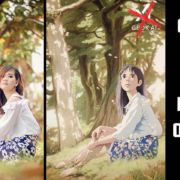
In today’s video, we will learn how to create Ghibli-type images on your PC without ChatGPT or Grok AI. It’s absolutely free—no hidden costs!
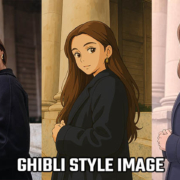
Here is how you can convert your normal photos to Ghibli-style images for free. To transform your images into Ghibli-style art, we will


Welcome to Hey, Let's Learn Something!
Please sign up here to receive the latest updates on our blogs, tutorials and download section :)